How to Check Your Caller ID Name (CNAM)

By Dmitry B. 7 min read
To check the caller ID name on your business number, do these three things:
- Call phones you own on other carriers. Use a mobile on a different network and, if you can, a landline, and look at what each screen shows.
- Ask your phone provider which name it has filed. The name has to be on file before any carrier can show it.
- Check how your number looks from the outside. See the business name, when there’s a listing for it, and the spam score tied to your number, so you can tell a name problem from a spam label.
The rest of this guide explains why the name differs from phone to phone, how an update travels, and how to fix the usual problems.
What is CNAM?
CNAM (Caller ID Name) is the short text name shown next to a phone number on an incoming call. It holds up to 15 characters, including spaces. Your number doesn’t carry the name with it; the receiving carrier looks it up when the call arrives.
That lookup happens separately on each receiving carrier, which is why two phones can show the same call differently.
How a CNAM update travels
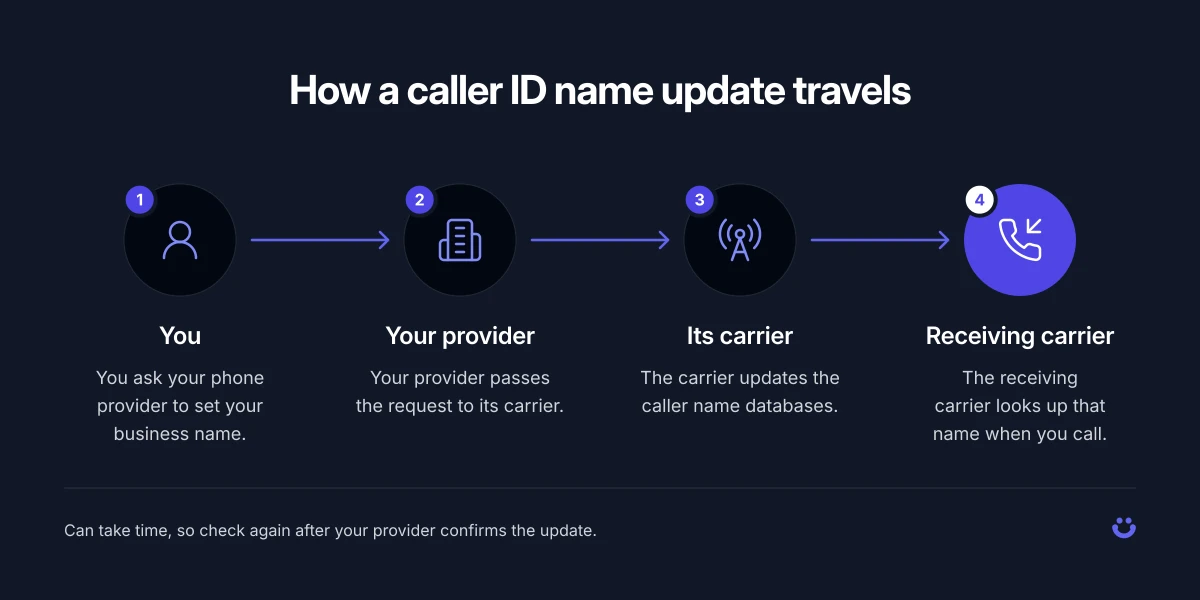
How a caller ID name update moves from your provider to the phone you call.
When you set or change your caller ID name, it passes through several hands before anyone sees it:
- You ask your phone provider to set your business name.
- Your provider passes the request to its carrier.
- The carrier updates the caller name databases.
- The receiving carrier looks up that name when you call.
Each handoff is a place where the update can stall. Some providers don’t file the name until you ask, and some carriers that receive your calls don’t look up names at all. Providers say the database usually updates within about 72 hours, but some receiving carriers only refresh daily or monthly, so the old name can linger. That’s how RingCentral and AT&T Office@Hand describe it for their own services. Check again after your provider confirms the update.
Three ways to check what your caller ID shows
1. Make test calls to phones on other carriers
This is the only check that shows what the people you call actually see. Call:
- a mobile phone on a different network from your own,
- a second mobile on another network, if you have one, and
- a landline, if you can reach one.
Write down exactly what each screen shows: the name, the number, a city and state, or a generic label. Different results on different carriers are normal. They tell you which carriers have picked up your name and which haven’t.
One thing to know before you start. Many mobile phones show the name from your own contacts first, so delete the number from the test phone’s contacts or use a phone that has never saved it.
2. Ask your provider which name is on file
Contact your phone provider’s support and ask two questions:
- What caller ID name is filed for this number, spelled exactly?
- When was it last submitted to the carrier?
If the name on file is wrong, missing or the old company name, nothing you test downstream will fix it. Ask them to resubmit it, and note the date so you know when to test again.
3. Check how your number looks from the outside
A correct name won’t help if your calls arrive marked as spam, and a lot of “my caller ID is wrong” complaints are really about a spam label. Run your number through our caller ID spam check. You check a number on the page, no account needed, and it shows the business name and industry tied to the number when there’s a listing for it, along with the spam score, reputation, complaint count and robocall share.
If you need that check inside your own software, or across every number you own, the CNAM lookup API returns the full business name, industry and location tied to a number, along with its spam score, in one request. Plans start at $25/mo for 5,000 lookups (Basic) or $99/mo for 20,000 (Premium); see pricing.
Neither of these shows the exact name your calls display on someone else’s phone. Only the test calls in step 1 do that.
CNAM is not a spam label
These are two separate systems, and people often mix them up:
- CNAM is the name. It comes from the caller name record your provider files.
- Labels like “Spam Likely” or “Scam Likely” come from the call blocking and analytics tools that carriers and apps use. They judge how a number behaves, for example how many calls it makes and whether people report them.
That’s why a business with a perfectly correct name can still show “Spam Likely”. Fixing the name won’t remove the label, and removing the label won’t fix the name. Check both.
Troubleshooting: common caller ID name problems
| What the called phone shows | Likely cause | What to do |
|---|---|---|
| Only the number, no name | The receiving carrier doesn’t look up names, or no name is filed | Test on another carrier. If every carrier shows no name, ask your provider to file one. |
| A city and state instead of your name | No caller name is filed, so the carrier shows the number’s location | Ask your provider to file your business name and confirm when it’s submitted. |
| “WIRELESS CALLER” or a similar generic label | The number has no name record, which is common for mobile numbers | Ask your provider whether it can file a name for this number type. |
| Your old company name | The old record was never replaced, or a receiving carrier still holds the old name (smaller carriers are more likely to) | Confirm the new name with your provider, ask for a resubmission, then test again later. |
| A cut off name | The name is longer than 15 characters, counting spaces | Pick a shorter version that still reads clearly, such as an abbreviation. |
| A garbled or missing name after an update | The name uses special characters, which many providers don’t support | Use letters, numbers and spaces only, then ask your provider to resubmit. |
| No name on a toll-free number | Toll-free numbers don’t show a caller name | Call from a local business number when the name matters. |
| “Spam Likely” or “Scam Likely” | A spam label from call analytics, not a CNAM problem | Run a caller ID spam check on your number and deal with the label separately from the name. |
A note on whose numbers to check
Everything in this guide is about checking your own business numbers. It isn’t a guide to finding out who is behind a private person’s number.
FAQ
How do I check my own caller ID name on my iPhone?
You can’t. Your own phone doesn’t show the name that goes out with your calls. Call another phone you own, ideally one on a different carrier that has never saved your number, and look at what it shows.
How long does a caller ID name update take?
It varies. RingCentral and AT&T Office@Hand say the database usually updates within about 72 hours, but some receiving carriers only refresh daily or monthly. Check again after your provider confirms it has submitted the change, and test on more than one carrier.
Why does my business number show a different name on different phones?
Each receiving carrier looks up the name on its own, and some don’t look it up at all. Mobile phones also show a saved contact name first. Test on a phone that has never saved your number.
How do I change my caller ID name?
Ask your phone provider. You can’t set the name on the caller name database yourself, so the provider files it through its carrier for you.
Why does my number show “Spam Likely” when the name is correct?
The name and the spam label come from different systems. A correct name doesn’t stop analytics tools from labelling a number. Run a caller ID spam check to see how your number looks.
See how your number looks from the outside. Check its business name, if listed, and spam score on the caller ID spam check, no account needed, or build it into your own tools with the CNAM lookup API.
Look up a number
Open the public record for any number. See the complaint count and the subject.
Look up a number