How to block spam calls in Asterisk and FreePBX

By Dmitry B. 9 min read
To block spam calls in Asterisk, add a check to the dialplan, because Asterisk has no spam filter built in. There are two ways, and most systems need both:
- Block numbers you already know with a blacklist in the Asterisk database (AstDB). It takes five minutes and stops repeat callers.
- Score the numbers you don’t know by calling a risk engine from an AGI script before the call reaches your users. This catches the spam that the blacklist can’t, because it’s from a number you’ve never seen.
The quickest blacklist is three lines in your inbound context:
[from-trunk]
exten => _X.,1,GotoIf(${DB_EXISTS(blacklist/${CALLERID(num)})}?blocked)
 same => n,Goto(inbound-routes,${EXTEN},1)
 same => n(blocked),Hangup(21)
Add a number from the Asterisk CLI with database put blacklist <number> 1. Hangup cause 21 is “call rejected”.
The rest of this post sets up both layers, then covers FreePBX and how to test it all.
Layer 1: a blacklist in the dialplan
AstDB is a key value store that ships with Asterisk, so a blacklist needs no extra software.
Add and remove numbers
From the Asterisk CLI (asterisk -rvvv):
database put blacklist <number> 1
database show blacklist
database del blacklist <number>
The last command removes the number again. Replace <number> with the caller’s number, in the same format your trunk sends in CALLERID(num). If one carrier sends it with a leading plus and another without, normalize the number before the lookup or store both.
Check every inbound call
Point your trunk’s inbound context at a context that checks the database first:
[from-trunk]
exten => _[+0-9]X.,1,NoOp(Inbound from ${CALLERID(num)})
 same => n,GotoIf($["${CALLERID(num)}" = ""]?anonymous)
 same => n,GotoIf(${DB_EXISTS(blacklist/${CALLERID(num)})}?blocked)
 same => n,Goto(inbound-routes,${EXTEN},1)
 same => n(anonymous),Playback(privacy-unident)
 same => n,Hangup(21)
 same => n(blocked),Hangup(21)
Replace inbound-routes with the context that routes your DIDs to users, queues and IVRs. The pattern _[+0-9]X. matches E.164 numbers with or without a plus.
The first GotoIf handles calls with no caller ID at all, so the blacklist lookup never runs with an empty number. Rejecting those is a policy choice. Some real callers withhold their number, so a message is kinder than silence.
Where a blacklist stops working
A blacklist only knows the numbers you put in it. Most spam campaigns rotate through numbers, so by the time you add one, the next call comes from another. For those you need a check that scores a number you’ve never seen.
Layer 2: score unknown callers with an AGI risk check
AGI (Asterisk Gateway Interface) lets the dialplan run a script and read back variables. The script sends the call details to a risk engine, gets an action back, and the dialplan acts on it.
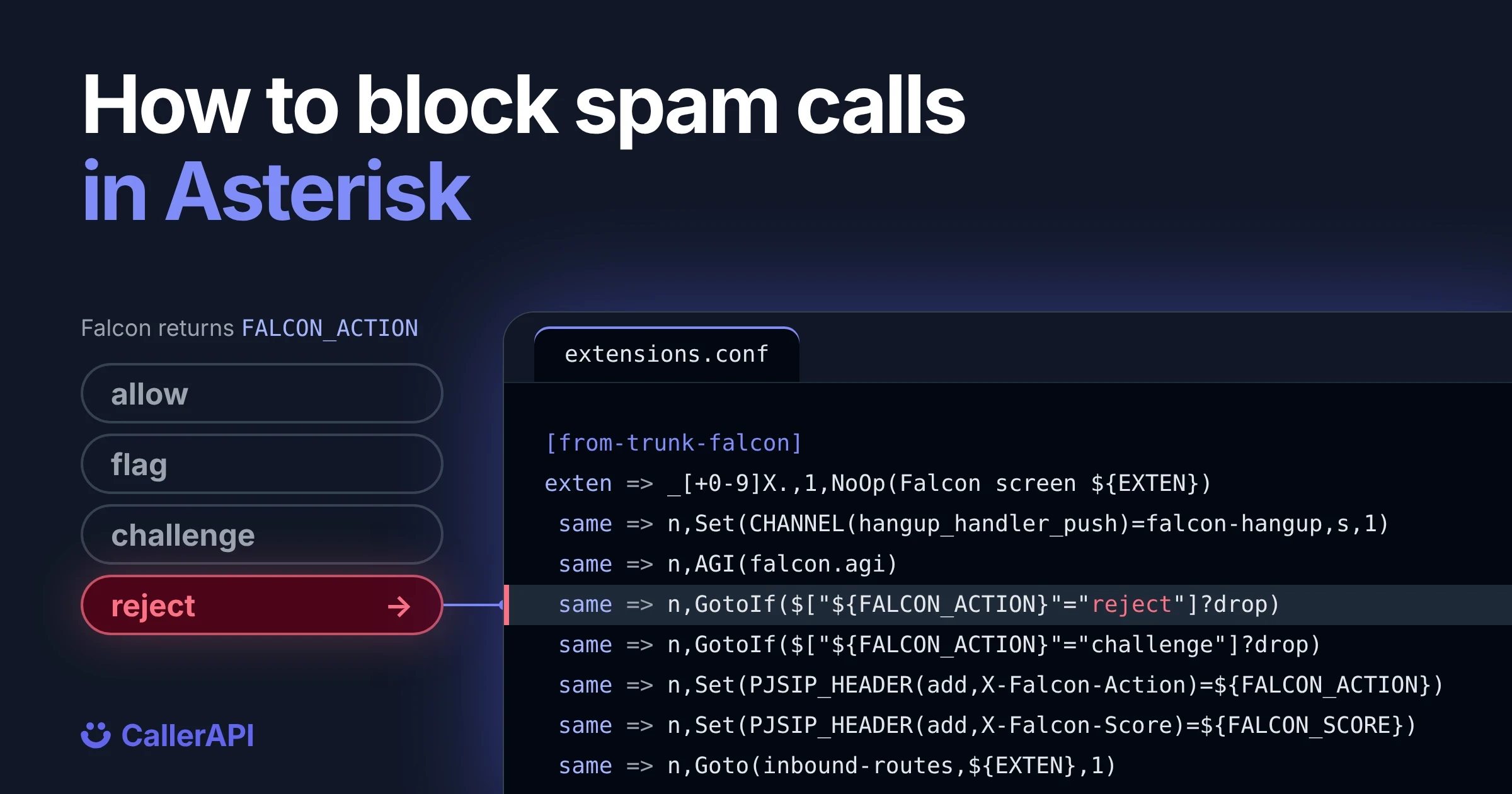
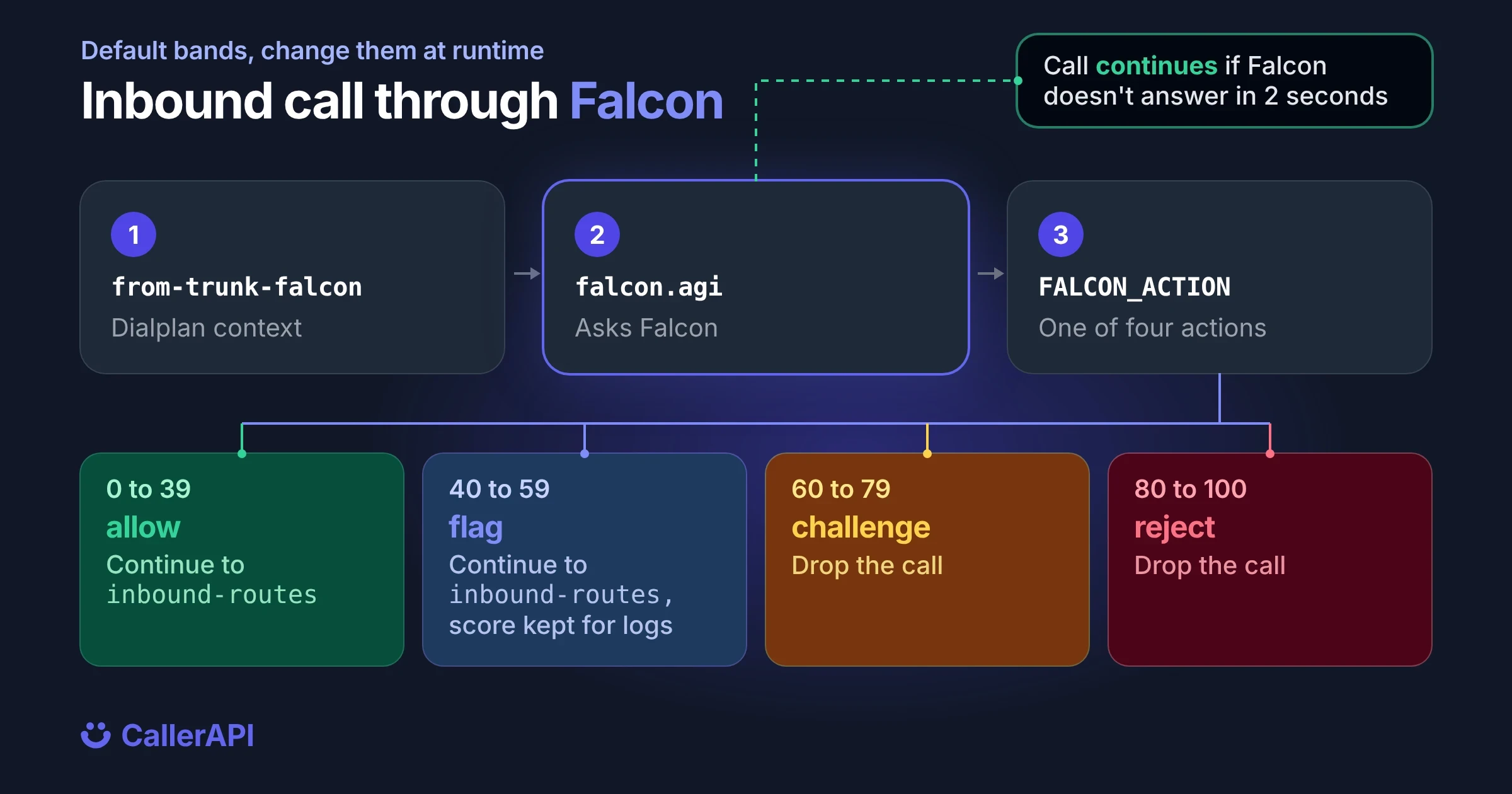
This walkthrough uses CallerAPI Falcon, a free, open source (Apache 2.0) risk engine you run on your own server. It sits beside Asterisk, not in the call path: Asterisk keeps the signaling and media, and Falcon only answers the question “what should happen to this call?” It returns one of four actions:
| Action | What the dialplan does |
|---|---|
allow |
Continue the call |
flag |
Continue. The action and score are in FALCON_ACTION and FALCON_SCORE for your logs or routing |
challenge |
Drop the call (or run your own challenge, if you have one) |
reject |
Drop the call |
Falcon scores each call from 0 to 100: 0 to 39 is allow, 40 to 59 flag, 60 to 79 challenge, 80 to 100 reject. It also verifies STIR/SHAKEN, applies your own allow and deny rules, and spots known SIP scanners. You can change all three thresholds at runtime.
Step 1: run Falcon
With Docker:
FALCON_TOKEN=$(openssl rand -hex 32); echo "FALCON_TOKEN=$FALCON_TOKEN"
docker run -d --name falcon -p 127.0.0.1:8090:8090 -v falcon-data:/data \
  -e FALCON_LISTEN=0.0.0.0:8090 -e FALCON_TOKEN="$FALCON_TOKEN" \
  -e FALCON_MODE=monitor \
  ghcr.io/callerapi/falcon:latest
Keep the printed token. Asterisk needs it, and so does the dashboard at http://127.0.0.1:8090. Pin a version tag instead of latest in production, and never publish port 8090 to the internet.
FALCON_MODE=monitor makes Falcon score every call and show you what it would have dropped, while telling Asterisk to allow everything. Run it that way for the first week, check the dashboard, then switch to enforce under Settings, Protection. No restart is needed.
Falcon can share redacted screening events with CallerAPI, which is how installs get network reputation back. Telemetry never carries the called number, and one flag turns it off: FALCON_SHARE=false.
Step 2: install the AGI scripts
Get falcon.agi and falcon_hangup.agi from the adapters/asterisk folder of the Falcon repository, then:
cp falcon.agi falcon_hangup.agi /var/lib/asterisk/agi-bin/
chmod +x /var/lib/asterisk/agi-bin/falcon*.agi
They use only the Python standard library. If they aren’t executable, Asterisk logs Permission denied and lets the call through, so check the log after your first test call.
Tell the scripts where Falcon is. Add these to the Asterisk environment, in /etc/default/asterisk or the systemd unit:
FALCON_URL=http://127.0.0.1:8090/v1/screen
FALCON_TOKEN=the-token-you-printed
Step 3: add the screening context (PJSIP trunks)
Point your trunk’s inbound context at from-trunk-falcon:
[from-trunk-falcon]
exten => _[+0-9]X.,1,NoOp(Falcon screen ${EXTEN})
 same => n,Set(CHANNEL(hangup_handler_push)=falcon-hangup,s,1)
 same => n,AGI(falcon.agi)
 same => n,GotoIf($["${FALCON_ACTION}"="reject"]?drop)
 same => n,GotoIf($["${FALCON_ACTION}"="challenge"]?drop)
 same => n,Set(PJSIP_HEADER(add,X-Falcon-Action)=${FALCON_ACTION})
 same => n,Set(PJSIP_HEADER(add,X-Falcon-Score)=${FALCON_SCORE})
 same => n,Goto(inbound-routes,${EXTEN},1)
 same => n(drop),Hangup(${IF($[${FALCON_HANGUP_CAUSE}>0]?${FALCON_HANGUP_CAUSE}:21)})

[falcon-hangup]
exten => s,1,AGI(falcon_hangup.agi)
 same => n,Return()
This is a trimmed version of extensions.conf in the repository, which also records short audio samples when Falcon asks for them. The hangup handler reports how each call ended, which helps Falcon score callers by behavior. A hangup handler runs in every context the call reaches, which an h extension doesn’t. The two PJSIP_HEADER lines come from the repository file. In this context they apply to the caller’s channel, so your phones never see them. To pass X-Falcon-Action and X-Falcon-Score on to your phones, set them in a pre-dial handler instead. It runs on the new channel to the phone, so pass the values in as arguments:
[falcon-headers]
exten => s,1,Set(PJSIP_HEADER(add,X-Falcon-Action)=${ARG1})
 same => n,Set(PJSIP_HEADER(add,X-Falcon-Score)=${ARG2})
 same => n,Return()
Then add it to the Dial() in inbound-routes, for example Dial(PJSIP/1001,30,b(falcon-headers^s^1(${FALCON_ACTION}^${FALCON_SCORE}))).
Never send allowed calls to from-internal or any context that can dial out. A caller from outside would get internal dialing rights and could place toll calls on your trunk.
Step 4: keep the blacklist too
Put the AstDB check from layer 1 in front of the AGI. Numbers you’ve blocked by hand are dropped at once, and everything else is scored:
[from-trunk-falcon]
exten => _[+0-9]X.,1,GotoIf(${DB_EXISTS(blacklist/${CALLERID(num)})}?blocked)
 same => n,Set(CHANNEL(hangup_handler_push)=falcon-hangup,s,1)
 same => n,AGI(falcon.agi)
 ; ...the rest as in step 3
 same => n(blocked),Hangup(21)
You can also keep the deny list in Falcon instead, with POST /v1/rules. Then the dashboard shows those blocks next to everything else.
What happens if Falcon is down
The AGI gives Falcon 2 seconds to answer. If Falcon is slow, stopped or unreachable, the call goes through: the script falls back to allow, and the dialplan drops a call only when the action is reject or challenge. Spam screening should never be the reason a real call fails.
How to block spam calls in FreePBX
FreePBX, Issabel and VitalPBX write their own dialplan, so don’t edit extensions.conf by hand. Both layers still work.
Layer 1 in FreePBX: the Blacklist module
For numbers you already know, use the Blacklist module under Admin. Add each number with a short description, and it’s rejected as the first step of every inbound route. The same module has an option to block calls with no caller ID.
Layer 2 in FreePBX: Falcon on the trunk
- Copy
falcon.agiandfalcon_hangup.agito/var/lib/asterisk/agi-bin/and make them executable, as in step 2 above. - Append
extensions_freepbx.conffrom the repository to/etc/asterisk/extensions_custom.conf. - Set the trunk’s inbound context to
from-trunk-falcon. - Click Apply Config, or run
fwconsole reload.
Trunks that deliver calls to the s extension instead of the DID pass through unscreened.
In FreePBX, allowed calls continue to from-pstn, the context FreePBX uses for inbound routes, so they work exactly as before. (In the plain Asterisk setup above, they continue to inbound-routes.) The scripts read FALCON_URL and FALCON_TOKEN from the Asterisk environment. If setting that is awkward on your distribution, the file has two commented Set lines where you can paste the same values.
Test it
Send a test request to Falcon before you route live calls. This one uses a known SIP scanner User-Agent, so it scores 100 because of the User-Agent, whatever the calling number. In monitor mode the response says "action":"allow" and "X-Falcon-Monitor":"reject", which is what enforce would do. After you switch to enforce, the action is reject:
curl -sS -X POST http://127.0.0.1:8090/v1/screen \
  -H 'Content-Type: application/json' \
  -H "X-Falcon-Token: $FALCON_TOKEN" \
  -d '{"switch":"curl","source_ip":"198.51.100.20","raw_sip":"INVITE sip:100@ex SIP/2.0\r\nVia: SIP/2.0/UDP 198.51.100.20;branch=z9hG4bK1\r\nFrom: <sip:+18883101970@ex>;tag=1\r\nTo: <sip:100@ex>\r\nCall-ID: demo\r\nUser-Agent: friendly-scanner\r\nMax-Forwards: 70\r\n\r\n"}'
Then place a real call through the trunk and watch the CLI. You should see Falcon screen followed by the AGI run, and the call should appear in the Falcon dashboard with its score and reasons.
If every call scores 0 in the CLI and nothing appears in the dashboard, check FALCON_TOKEN. A wrong token gets a 401 from Falcon, and the AGI lets every call through unscreened.
Running Asterisk for other people’s traffic
If your Asterisk sits on a wholesale or class 4 ingress rather than in front of one office, start Falcon with FALCON_PROFILE=carrier. The default scoring is tuned for a PBX trunk, where one IP sending 30 calls a minute is a scanner. On a carrier ingress that’s a normal customer. The carrier profile keeps the hard blocks, such as your deny rules, and turns everything else into a flag.
Add a spam number list
Falcon works without any outside service. If you also want known spam numbers rejected before scoring, connect it to the CallerAPI spam list: set CALLERAPI_API_KEY and FALCON_SPAM_FEED=true. This is a paid connection, and a hit is a hard reject that names its source in X-Falcon-Block. See the spam phone number database for what it covers.
FAQ
How do I block a phone number in Asterisk?
Add it to AstDB with database put blacklist <number> 1, then check DB_EXISTS(blacklist/${CALLERID(num)}) at the top of your inbound context and hang up with cause 21 when it matches.
How do I block spam calls in FreePBX?
Use the Blacklist module for numbers you know. For unknown spam, append Falcon’s extensions_freepbx.conf to extensions_custom.conf and point the trunk at from-trunk-falcon, so every call is scored before your inbound routes.
Does call screening slow down calls?
The AGI gives Falcon 2 seconds to answer and lets the call through if it doesn’t. Falcon runs on your own server next to Asterisk, so there’s no round trip to an outside service on the call path.
Can I block calls with no caller ID in Asterisk?
Yes. Check for an empty ${CALLERID(num)} in the inbound context and play a message or hang up. Some real callers withhold their number, so consider a message rather than a silent drop.
Screen every inbound call: see Falcon, our free self-hosted robocall mitigation software, or get the adapters from GitHub.
Look up a number
Open the public record for any number. See the complaint count and the subject.
Look up a number