Spam call detection API: how to screen calls with code

By Dmitry B. 8 min read
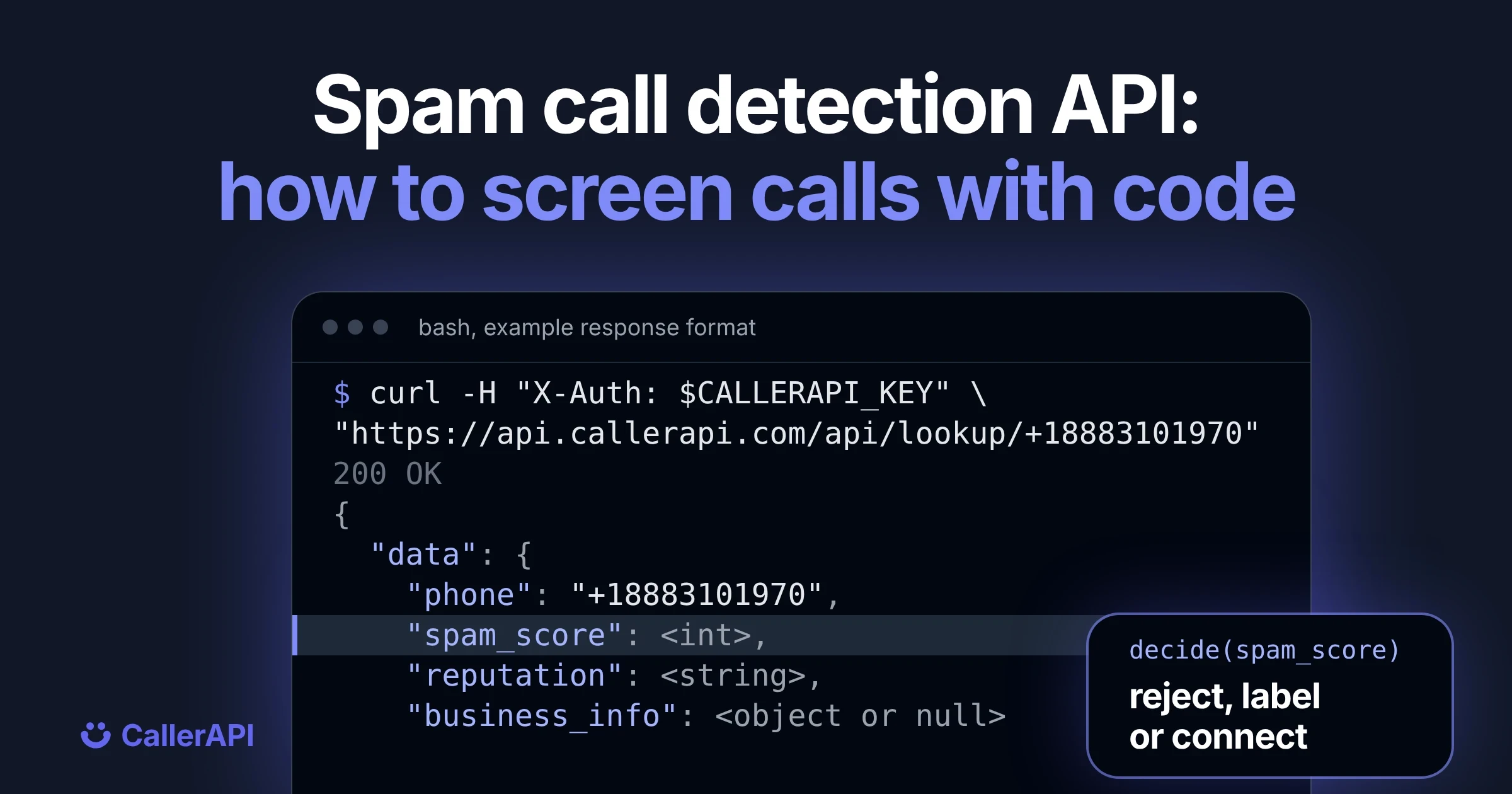
A spam call detection API tells you whether an incoming call is likely spam before the phone rings. Send the caller’s number the moment the call arrives, read the score that comes back, and decide what happens next. With CallerAPI that is one request:
curl -H "X-Auth: $CALLERAPI_KEY" \
  "https://api.callerapi.com/api/lookup/+18883101970"
The response tells you whether the number has a spam record, how risky it is right now on a scale of 0 to 100, and whether it belongs to a verified business. Here is its shape, with each value described rather than filled in:
{
  "status": "success",
  "data": {
    "phone": "+18883101970",
    "entity_type": BUSINESS or UNKNOWN,
    "reputation": SPAM, VERIFIED or UNKNOWN,
    "is_spam": true or false,
    "spam_score": 0 to 100,
    "total_complaints": a count,
    "business_info": the listing, or null
  }
}
Run the request yourself to see real values. The spam score docs show every field.
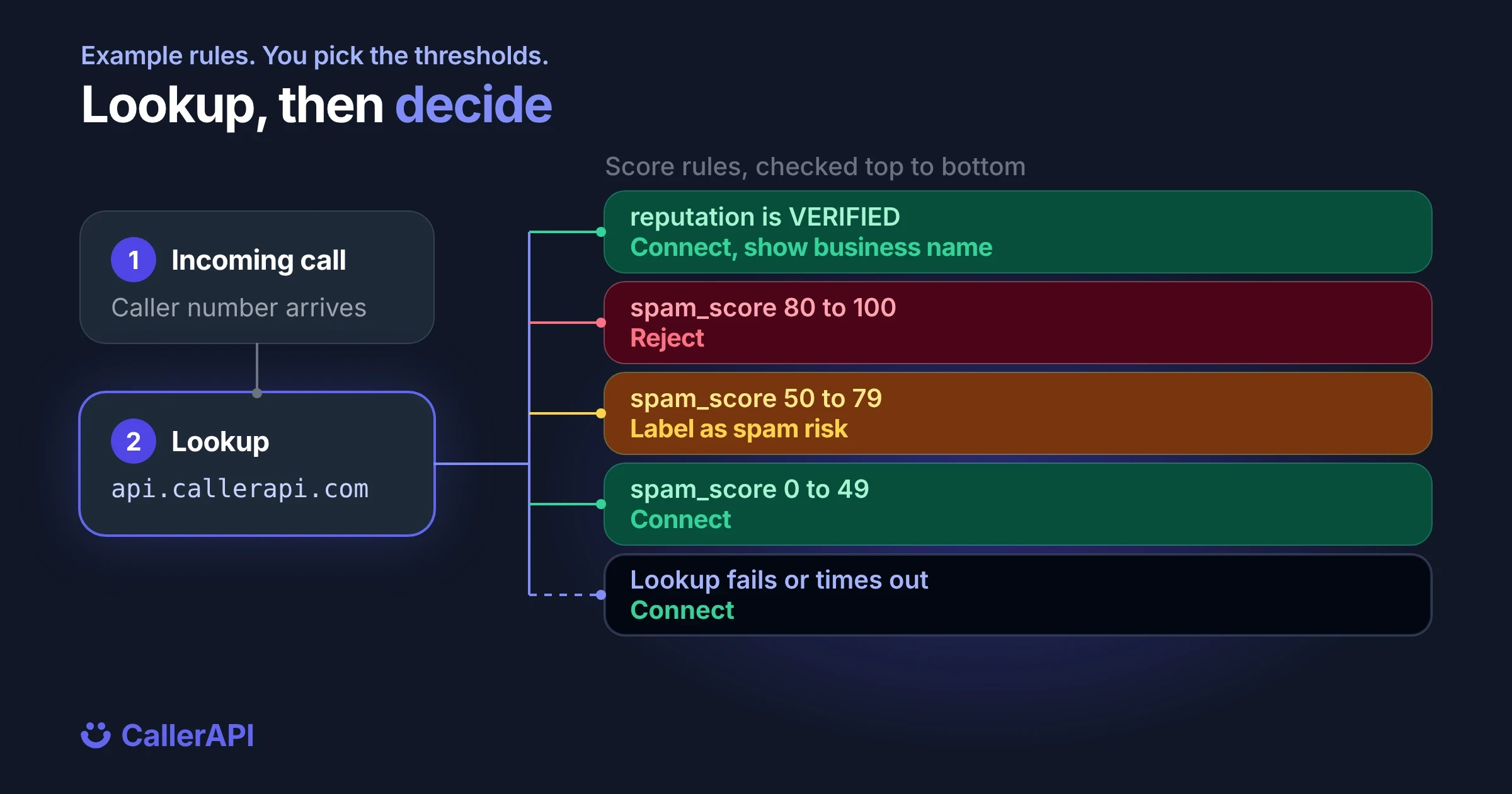
Your code then applies a rule. A common one: reject at 80 or above, label from 50 to 79, connect everything else. The rest of this post walks through each step, with code you can paste.
What a spam call detection API checks
A spam call detection API answers one question about the calling number: what do we know about how this number has behaved? It doesn’t listen to the call and it doesn’t need the audio. It works from the number alone, which is why it can run before the call is answered.
CallerAPI checks each number against 17 active reputation sources plus a numbering plan check, across 195 countries, and returns four fields you can act on:
| Field | What it tells you | Values |
|---|---|---|
spam_score |
Current risk | 0 to 100 |
is_spam |
Whether the number has any spam record | true or false |
reputation |
Overall label | SPAM, VERIFIED or UNKNOWN |
business_info |
Who owns the number, if it’s a listed business | Name, city, state, industry, verified, or null |
VERIFIED means a business that claimed and verified its listing. A number that can’t exist under the numbering plan scores 100.
Step 1: get an API key and make your first lookup
Create an account, copy your API key from the dashboard, and keep it in an environment variable rather than in your code:
export CALLERAPI_KEY="your-api-key"
Send the number in E.164 format, with the country code and a leading plus. The key goes in the X-Auth header. The full reference, including every response field, is in the spam score docs.
Each lookup costs 1 credit. The credit is charged when the request arrives, so an empty or malformed number still costs a credit. Validate the number on your side before you send it.
Step 2: call the API from your backend
Python
This uses the requests library and Python 3.10 or later.
import os
import requests

API = "https://api.callerapi.com/api/lookup/"

def check_number(phone: str) -> dict | None:
    """Return the lookup data for a number, or None if the check failed."""
    try:
        r = requests.get(
            API + phone,
            headers={"X-Auth": os.environ["CALLERAPI_KEY"]},
            timeout=1.0,  # stay well inside your call platform's webhook timeout
        )
        r.raise_for_status()
        return r.json()["data"]
    except requests.RequestException as err:
        print(f"lookup failed for {phone}: {err}")
        return None

data = check_number("+18883101970")
if data:
    print(data["spam_score"], data["reputation"])
Node.js
Node 18 or later has fetch and AbortSignal.timeout built in:
async function checkNumber(phone) {
  try {
    const res = await fetch(
      `https://api.callerapi.com/api/lookup/${encodeURIComponent(phone)}`,
      {
        headers: { "X-Auth": process.env.CALLERAPI_KEY },
        signal: AbortSignal.timeout(1000),
      }
    );
    if (!res.ok) throw new Error(`HTTP ${res.status}`);
    return (await res.json()).data;
  } catch (err) {
    console.error(`lookup failed for ${phone}: ${err.message}`);
    return null;
  }
}
Both functions return null or None when the check fails, so the calling code can decide what a failure means. Step 4 covers that.
Step 3: turn the score into an action
The API gives you a score. The decision is yours, because the right line for a contact center isn’t the right line for a carrier. Start with this policy and tune it after a week of real traffic:
| Condition | Action |
|---|---|
reputation is VERIFIED |
Connect, and show the business name from business_info |
spam_score is 80 or more |
Reject the call |
spam_score is 50 to 79 |
Connect with a spam risk label, or send to voicemail |
| Anything else | Connect |
In code:
BLOCK_AT = 80
LABEL_AT = 50

def decide(data: dict | None) -> str:
    if data is None:
        return "connect"          # fail open, see step 4
    if data["reputation"] == "VERIFIED":
        return "connect"
    if data["spam_score"] >= BLOCK_AT:
        return "reject"
    if data["spam_score"] >= LABEL_AT:
        return "label"
    return "connect"
Should you block on is_spam or spam_score?
Block on spam_score. is_spam stays true while any complaint is on file, so it tells you about history. spam_score tells you about risk now: it fades as complaints age and reaches 0 after 180 days with no new reports. A number with one old complaint can be a real caller today, and a score lets you treat it that way.
Step 4: handle failures and timeouts
A spam check sits in front of real calls, so plan for the moments it can’t answer:
- Set a short timeout. One second is a sensible cap. The API gateway itself cuts any request at 15 seconds, far longer than a caller will wait.
- Fail open. If the lookup times out or errors, connect the call and log the miss. One spam call that gets through costs a little. A real customer you drop costs a lot more.
- Don’t retry on the call path. Every retry is a new lookup and costs another credit, and the API doesn’t support idempotency keys.
- Watch for 402. When your plan runs out of credits, every lookup returns
402with"Insufficient credits". With fail open, screening quietly stops while calls keep flowing, so alert on it. - Treat 401 as a config error.
401means the key is missing or wrong. It isn’t charged, and it won’t fix itself.
| Status | Meaning | Charged |
|---|---|---|
200 |
Lookup done | Yes |
400 |
The value has no digits, for example empty, “anonymous” or letters only | Yes |
401 |
Missing or invalid API key | No |
402 |
Out of credits | No |
500 or 504 |
The lookup failed or ran past 15 seconds | Yes, the credit is taken before the lookup runs |
503 |
Service temporarily unavailable | No |
Step 5: put the check where the call arrives
The lookup only helps if it runs before the call is answered. Every voice platform has a point where it asks your server what to do with an incoming call:
| Where your calls land | Where the check goes |
|---|---|
| Twilio, Vonage or another CPaaS | The incoming call webhook |
| Asterisk or FreePBX | An AGI script in the inbound context |
| FreeSWITCH | A Lua or HTTP hook in the inbound dialplan |
| An SBC or class 4 switch | A routing hook or SIP redirect server |
| A mobile app | The app’s call screening service, from a cached result |
For a full Twilio and Vonage example, see how to block spam calls before your voice AI agent answers.
Add carrier data when you need it
Add ?hlr=true to the request and the response also carries carrier_info: the current carrier, line type, LRN and port status. It costs the same 1 credit. The carrier check can take longer than the spam check, so keep hlr off in the live call path and use it for offline checks such as lead or signup screening.
What a number lookup can’t catch
A reputation check knows only what has been reported. A scam call from a brand new number with no history will score low. For those calls, analyze the audio during the call. The CallerAPI voice firewall does that and returns a scam verdict while the call is in progress. Run both if you need both.
FAQ
Is there an API to check if a phone number is spam?
Yes. A phone reputation API takes a number and returns its spam status. The CallerAPI robocall scoring API returns a spam flag, a score from 0 to 100 and a reputation label for numbers in 195 countries, in one GET request.
How does a phone number spam score API work?
It takes a phone number and returns a score from 0 to 100 that rates how likely the number is to be spam right now. CallerAPI bases it on complaints and how recent they are, so the score drops as reports age, and a number that can’t exist under the numbering plan scores 100.
What spam score should I block at?
Start by rejecting at 80 and labeling from 50 to 79. Review what was rejected after a week and move the lines to fit your traffic.
How much does a spam lookup cost?
Each lookup is 1 credit, including empty and invalid numbers, and a retry is a new lookup. Requests turned away for a missing key (401) or no credits (402) aren’t charged. Plans start at $25 a month for 5,000 lookups. See pricing.
Can I test a number without writing code?
Yes. The caller ID test checks one number in your browser, with no signup.
Start screening calls: see the robocall scoring API to set your own thresholds, or read the API docs.
Look up a number
Open the public record for any number. See the complaint count and the subject.
Look up a number